Skip to content
crm migration
Pipedrive CRMAttio CRM

Move your Pipedrive CRM data into Attio CRM

Your custom fields, your history, your relationships. Not only the fields both apps happen to have in common.

Start free assessment

We run Pipedrive CRM to Attio CRM migrations. The assessment is free and comes before any commitment.

What moves

Every object, and where it lands in Attio CRM.

Pipedrive CRM

Organizations
Companies
People
People
Deals
Deals
Notes
Attio notes, on the record they belong to
Call and meeting activities
An activities object we create in your workspace one object holding both kinds, so your history costs your plan a single slot
Your other activities
Attio tasks every activity type that is not a call or a meeting, including the ones you added yourself
Files
Attio's file store, on the record they were attached to
Products
A products object we create in your workspace
Pipelines and stages
Built onto the deal stage list your Attio workspace already has every stage your account names is created before a single deal is written
Custom fields
Created as attributes on the object they belong to
Users
Matched to your Attio workspace members by email and you name who inherits the records of anyone with no match
Links between records
Attio's own references between companies, people and deals a deal keeps every person on it rather than the first one
Start free assessment
What comes across

Comprehensive by default, customizable on request.

Relationships, not just records

The graph survives. Deals stay attached to the right contacts and companies, activities stay on the record they belong to, and the links between them are rebuilt in Attio CRM rather than left behind.

Your custom fields come with you

They are found in Pipedrive CRM and created in Attio CRM before a single record is written. Not flattened into a notes field.

History, not just the current state

Notes, calls and meetings arrive on the record they belong to, with their owners and timestamps intact.

Owners, pipelines and stages are reconciled

Matched to your Attio CRM users and stages rather than reset to a default.

Nothing is silently rewritten

Where a conversion is genuinely lossy, the original value comes across alongside the converted one, so you can always see what the data was before we touched it.

A field with no home is brought along

If Attio CRM has no native place for something you use, we can create one for it rather than drop it.

What happens to the rest

Where it is not a clean match, here is what happens.

Every one of these says what you get instead, and the detail behind it carries the vendor's own documentation so you can check the claim yourself. You see how each applies to your data in the free assessment, before you commit to anything.

What your plan decides

Calls, meetings and your catalogue need an Attio Pro workspace

Explain moreHide the detail

Attio lets a workspace add an object of its own only from Pro upwards. Below that a workspace is companies and people plus one or three of Attio's own, and there is nowhere for a call, a meeting or a product to be created. Your organizations, people, deals, notes, tasks and files need no object at all and land on any plan.

Verified against attio.com

We tell you which of these your migration needs before you commit to anything.

Comes across, with a difference

An Attio deal has six fields

Explain moreHide the detail

Name, stage, owner, value, and the company and people it links to. That is the object, and Attio designed it that way. So a Pipedrive deal's expected close date, its label, its lost reason and the custom fields you use to qualify it have no attribute of their own to land in.

Verified against docs.attio.com

Each one is preserved on the deal exactly as Pipedrive had it, rather than pushed into a field that means something else, and the free assessment shows you which of your deal fields this affects before anything runs.

Attio keeps one list of deal stages, not pipelines

Explain moreHide the detail

A Pipedrive account is built around pipelines, each with its own stages, and most accounts run several. An Attio deal has one stage attribute, a single status with one list of options. Two stages that share a name merge onto one, and which pipeline it came from is not something Attio can hold afterwards. That is the largest single change of shape in this move.

Verified against docs.attio.com

Every deal keeps the stage it was in, won or lost or still open, so nothing needs re-marking by hand.

Won and lost do not travel as their own fact

Explain moreHide the detail

Pipedrive keeps won and lost on the deal itself rather than at the end of the funnel, which is why it survives a move into most CRMs. An Attio deal publishes six attributes, its name, stage, owner, value and the two records it links to, and no won or lost flag beside them. So the outcome has to travel as the stage it was in.

Verified against docs.attio.com

A deal you marked won lands in your won stage, and we do not read a win off a stage name.

A note does not keep who wrote it

Explain moreHide the detail

Attio's create-a-note endpoint takes no author, so a note arrives stamped with the workspace member whose connection wrote it. A note that says Priya wrote it in Pipedrive will not say so in Attio. The note itself, its title, its text and the date it was written all come across, on the record it belonged to. It is a small loss, and one we would rather you read here than notice later.

Verified against docs.attio.com

The note itself, its title, its text and the date it was written all come across, on the record it belonged to.

Stays where it is

Nobody owns an organization in Attio

Explain moreHide the detail

Attio's writeable attributes for a company are its name, domains, description, team, categories, location and social links. There is no owner among them, because Attio models ownership on the deal and leaves the rest to lists and views. Your Pipedrive owners travel on your deals, and the owner on an organization is one of the few things this migration reads and cannot place.

Verified against docs.attio.com

Your owners travel on your deals, and you say who takes the organizations and the people.

And if it goes wrong

You can undo it in one action. If a migration stops, it resumes where it left off.

Undo the records we wrote

Every write into Attio CRM is recorded, so one action takes the records we wrote back out again, in reverse. If it is not what you expected, restore and retry.

Paused, not lost

A stop, an error or an API limit pauses the run at its last checkpoint rather than killing it. Nothing is lost and nothing is written twice.

Read-only in Pipedrive CRM

Nothing is ever written back into Pipedrive CRM. It is the system you are leaving, and we only read it.

A last catch-up before you switch over

After the main load, one action brings across everything that changed in Pipedrive CRM since, so you can verify with both systems live and then switch over.

What an undo takes back out

In Attio CRM after the migration

The records we wrote
Removed
The history and attachments that came with them
Removed
Except products and price lists, where we brought them across
Left in placeYou may have priced these into your own quotes or reported on them by now. Taking them back out would reach into your work rather than ours.
The custom fields we created to hold it all
Left in place, emptyHidden from your page layouts. We can clear them up separately, on request.
What it costs

One price, one time, set by how many records you move.

From $399

That covers up to 20,000 records. The price steps up with volume and it is for the migration, not a subscription. Nothing recurs.

The free assessment settles the number

It reads Pipedrive CRM and reports what is actually in it, so your price comes from your real record count rather than a sales call. You see it before you commit to anything.

A 30-day money-back guarantee

Ask for a refund within 30 days of your migration being marked complete. We reverse the migrated data out of Attio CRM and refund you.

See every plan and work out your price.

FAQ

Questions about moving Pipedrive CRM to Attio CRM

Will my Pipedrive custom fields come across?

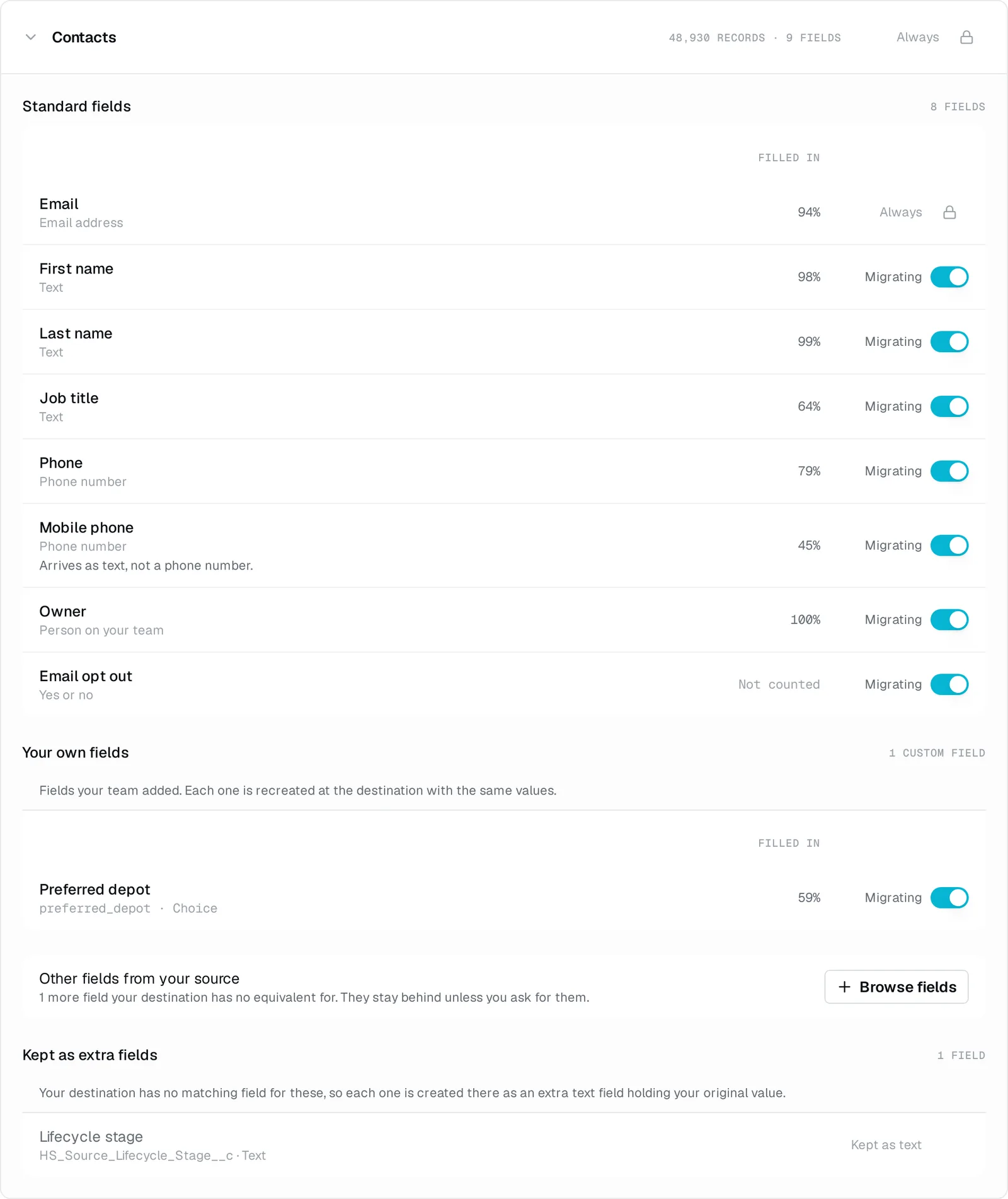
Yes. The free assessment finds them in Pipedrive, and they are created as attributes on the matching Attio object before a single record is written. You see that mapping before anything runs, and you can drop the fields nobody fills in any more rather than carry them over.

What happens to my activities?

Your call activities and meetings land in one activities object we create in your workspace, because Attio ships no record for an interaction at all. Every other activity type, including the ones you added yourself, lands as an Attio task. Your notes land as Attio notes, which Attio has natively.

Why do calls and meetings need a Pro workspace?

Because landing them means adding an object to your workspace, and Attio allows that only from Pro upwards. It is a choice on your plan rather than a surprise. Leave them out and this migration creates nothing in your workspace at all, and your organizations, people, deals, notes, tasks and files still come across.

Do my pipelines survive?

The stages do, the pipelines do not, and this is the biggest change of shape in the move. Every stage your deals sit in is created on Attio's deal stage list before the load runs, so each deal arrives in the stage it was in. Attio keeps one list rather than a stage set per pipeline, so two pipelines that both have a Qualification stage arrive as one.

What happens to a deal I marked won?

It lands in the stage that meant won. Pipedrive keeps won and lost on the deal itself, and Attio has no equivalent flag, so the outcome travels as the stage rather than as its own fact. We do not read a win off a stage name, and the free assessment shows you how your stages will land before anything runs.

Does my email history come across?

No, and the reason is on Pipedrive's side. Pipedrive keeps email in each user's own synced mailbox and that inbox stays private to that user whatever the permissions in the account, so there is no company-wide email history for us to read. Your calls, meetings, tasks and notes come across.

What about the products priced on my deals?

Your product catalogue comes across into an Attio products object. The line items priced on each Pipedrive deal do not yet, and that one is our limit rather than Attio's, so it is on your plan before you pay rather than a surprise after the run.

Do I have to build a field map?

No. The mapping is written for this one direction and shown to you before anything runs, so your part is reviewing it rather than assembling it. A Pipedrive field with no native home in Attio can be brought along as a new attribute instead of being left behind.

Who actually runs the migration?

You create an account and connect Pipedrive, and the free assessment tells you what is in it and what it costs. Attio is connected next, so we can check it against what your workspace can hold. I run the migration itself and stay reachable while it does. Nothing moves until you ask for it.

Can I keep working in Pipedrive while this happens?

Yes. Nothing is ever written back into Pipedrive, we only read it. After the main load, one action brings across everything that changed in Pipedrive since, so you can verify with both systems live and switch over when you are ready.

What if the result is not what I expected?

Every write into Attio is recorded, so one action takes the records we wrote back out again. You can sort out what was wrong and run it again.

What does it cost?

One price, one time, based on how many records the migration moves. The free assessment counts them in your Pipedrive and gives you the exact price before you commit to anything. There is no subscription and no card form.

Next step

Create an account, connect Pipedrive CRM, and get your real record count and your price before you commit to anything. Nothing moves until you ask for it.

Start free assessment