

Skip to content
crm migration
Freshsales CRMHubSpot CRM

Move your Freshsales CRM data into HubSpot CRM

Your accounts, contacts and deals, with the supported notes, tasks and files. See what travels and what stays in Freshsales before switching over.

Start free assessment

We run Freshsales CRM to HubSpot CRM migrations. The assessment is free and comes before any commitment.

Running this for a client? Explore partnership options.
What moves

See where each object lands in HubSpot CRM.

Freshsales CRM

Accounts
Companies
Contacts
Contacts
Deals
Deals
Notes
Notes
Tasks
Tasks
Appointments
Meetings
Attached files
Files attached to migrated records Files need a parent record included in the migration.
Custom fields
Custom fields on the matching records The plan identifies fields to create and any changes to their values.
Record owners
Matched to HubSpot CRM users You choose who inherits records with no matching owner.
Deal stages
Matched to destination deal stages We review stage choices before the run, including which deals are open, won or lost.
Start free assessment
What comes across

Keep the data that matters to you.

Keep records connected

Keep deals linked to contacts and companies, and activities linked to their records in HubSpot CRM.

Your custom fields come with you

We find your custom fields in Freshsales CRM and plan how their values will travel to HubSpot CRM before migrating their records.

Bring your activity history

Your activity history arrives on the record it belongs to. This page names which types transfer and any limit on them.

Match owners, pipelines and stages

We match them to your HubSpot CRM users and stages.

Review changes before the run

The plan flags values that change during migration. The original value comes across beside the converted one.

Keep data with no matching field

Where possible, we create a field in HubSpot CRM for data with no matching field.

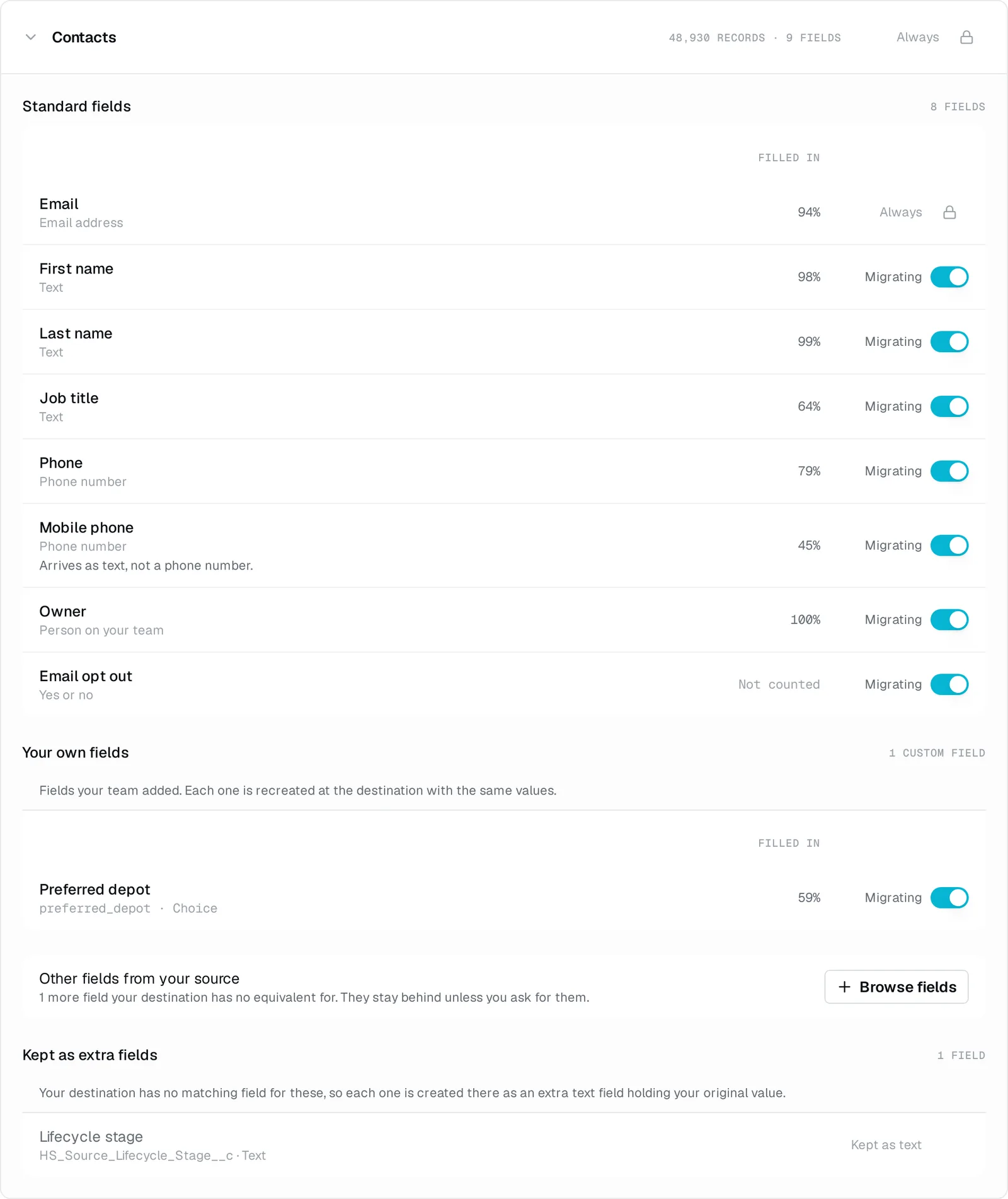
A Contacts plan showing standard fields, a custom field, usage percentages and migration switches.
Demo output. Our HubSpot demo uses synthetic records. This Contacts plan shows custom field usage and which fields will migrate. View at full size.

Demo output from our own system. Synthetic records, not customer data.

Before you move

Check your Freshsales scope before switching to HubSpot

We read accounts, contacts and deals from the saved views selected for the migration. We check those views with you so the scope includes the records you intend to bring. Notes and files are read with their parent records. Keep access to Freshsales for the calls, emails and other records listed as outside this migration.

Accounts become companies. Contacts, deals, notes, tasks and appointments are handled as the corresponding HubSpot records.

Connect Freshsales using the API key and account address from Profile Settings, API Settings. Your source connection gives you the free record count and price.

Limits and changes

Know what changes and what stays behind.

Each row explains a limit and what you can do about it. Open the details for the reason and supporting source.

Needs setup or a plan change

How many custom properties HubSpot will hold depends on your plan

View detailsHide details

HubSpot caps custom properties per object, and the cap moves with your subscription. A Freshsales account that has grown a lot of custom fields can exceed it.

Verified against knowledge.hubspot.com

We count yours in the free assessment and show you the number against your plan's limit, so you can decide what to bring rather than find out during the run.

Missing required fields can block records

View detailsHide details

HubSpot rejects records that are missing fields your admin requires. Some fields are required only when another field has a particular value. We report which field is missing so you can correct it.

Verified against developers.hubspot.com

We report missing required fields during the migration. The assessment does not check these rules. Fill in the missing values in your source CRM or ask your HubSpot admin to change the rule, then we retry without duplicating records.

Linking records requires Edit Associations permission

View detailsHide details

HubSpot calls links between records associations, such as a deal linked to a company. Without Edit Associations permission, HubSpot blocks us from creating those links.

Verified against developers.hubspot.com

Connect using a HubSpot user with Edit Associations permission. If you have already connected, ask your admin to grant that user the permission. We can then retry the missing links.

Moves with changes

Closed-deal reporting needs a stage review

View detailsHide details

Our Freshsales source carries stage names without declaring whether each stage means won, lost or open.

We review how your stages should be treated before the migration runs.

Stays in the source CRM

Calls and email conversations stay in Freshsales

View detailsHide details

Our Freshsales source does not read phone calls or email conversations.

Your notes, tasks and appointments can still travel.

Custom modules, products and line items are outside this migration

View detailsHide details

Our Freshsales connector does not carry these records in either direction.

Accounts, contacts, deals, notes and tasks are included in the supported scope.

Marketing consent is not migrated

View detailsHide details

We do not read or write subscription status through our Freshsales connector.

Review consent separately before using the destination for marketing.

Stay in control

Paused runs resume. You can undo the migration.

Undo the migration

One action removes the records we wrote to HubSpot CRM. Review what will remain before you undo and retry.

Paused runs resume

A paused run resumes where it stopped, without losing progress or duplicating records.

Read-only in Freshsales CRM

We only read Freshsales CRM. Nothing is written back to it.

Catch up before switching over

Keep working in Freshsales CRM while you check the results. Then bring across the latest changes before switching over.

What undo removes and what remains

In HubSpot CRM after the migration

The records we wrote
Removed
The history and attachments that came with them
Removed
Except products and price lists, where we brought them across
Left in placeThese may be used in your quotes or reports, so removing them could affect other work.
The custom fields we created
Left in place, emptyWe can remove these separately on request.
What it costs

One payment, based on the records you move.

From $799

Covers up to 20,000 records. Larger migrations use higher tiers. You pay once per migration, with no recurring charge.

Get your exact price for free

Connect Freshsales CRM to see your record count and price before you commit.

A 30-day money-back guarantee

Ask for a refund within 30 days of your migration being marked complete. We reverse the migrated data out of HubSpot CRM and refund you.

View pricing.

FAQ

Questions about moving Freshsales CRM to HubSpot CRM

Will my Freshsales custom fields come across?

We discover your Freshsales custom fields and plan them for the matching HubSpot CRM records. Review the plan for type changes and fields you prefer to leave behind.

Do calls and emails come across?

No. Our connector leaves calls and email conversations in Freshsales. Review the supported activity types above before switching over.

Will won and lost deals be labelled correctly?

We review stage choices with you. The Freshsales connector does not infer won or lost from a stage name, so this needs attention before you rely on destination reports.

Who actually runs the migration?

We run the migration and stay reachable. Connect Freshsales for the free assessment and price, then HubSpot to complete the plan. Nothing moves until you ask.

Can I keep working in Freshsales while this happens?

Yes. We only read Freshsales and never write back to it. Keep working while you check the results, then bring across the latest changes before switching over.

What if the result is not what I expected?

You can undo the migration, correct the issue and run again. Created fields, shared catalogue data and any other items listed as retained stay in place.

What does it cost?

One payment, based on the records that move. The free assessment of Freshsales gives you the exact count and price before you commit. Payment is by invoice, with no subscription.

Next step

Create an account and connect Freshsales CRM for your free assessment. See your record count and price before you commit. Nothing moves until you ask.

Start free assessment