Demo output from our own system. Synthetic records, not customer data.
See a HubSpot assessment before connecting your CRM.
Explore a real assessment of our demo HubSpot CRM, prepared for migration to Salesforce CRM. See the record counts, which fields are used, what changes during migration and what it costs.
01 Objects and record counts
Connect only the source CRM to get the counts and price. The assessment writes nothing to either CRM.
190,945 records. See what counts toward the price.
Pricing is based on record count. Notes, calls and tasks count as records, just like contacts. Custom fields and links between records do not add to the count.
Object
Records
Companies
12,480
Contacts
48,930
Deals
9,860
Notes
61,240
Tasks
21,470
Calls
14,905
Products
640
Line items
18,300
Delivery routes
3,120
Total in the source
190,945
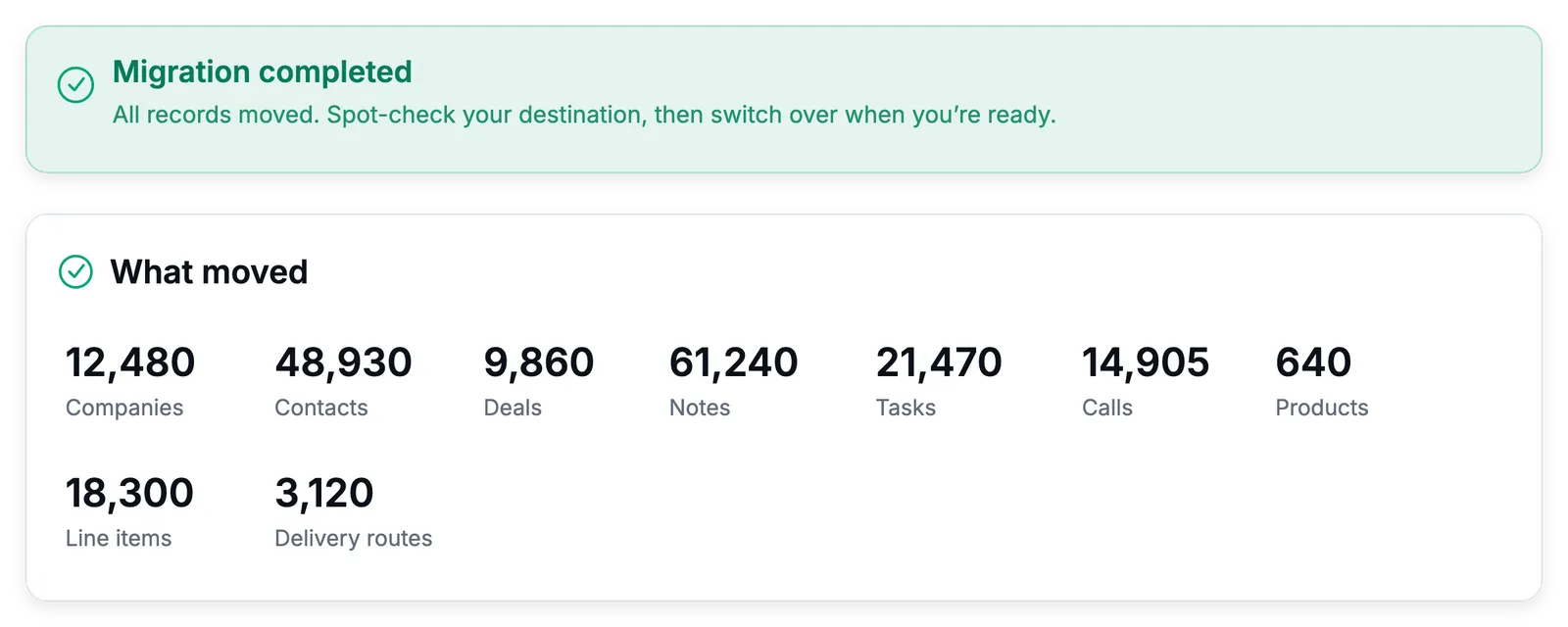
These counts come from the completed demo migration below. Their total matches the assessment.
Demo output. Completed demo migration. The table above uses these record counts. View at full size.
02 Field usage
See which fields your records actually use.
Spot unused custom fields and choose what to leave behind. This plan covers 51 fields across 9 record types. Each percentage shows how many records have a value in that field. Notes are quoted directly from the product.
Companies
12,480 records, 10 fields
Standard fields, 8
Filled in
NameText
100%
Website domainText
95%
IndustryChoiceValues with no matching option are left empty. The original value is kept beside it, in an extra field.
73%
Annual revenueAmount
35%
EmployeesNumber
48%
PhonePhone number
71%
OwnerPerson on your team
100%
DescriptionLong text
26%
Custom fields, 2
Filled in
Account tierkestrel_tier, choice
82%
Route densityroute_density, number
61%
2 more fields from the source have no matching field in Salesforce CRM. Choose whether to include them.
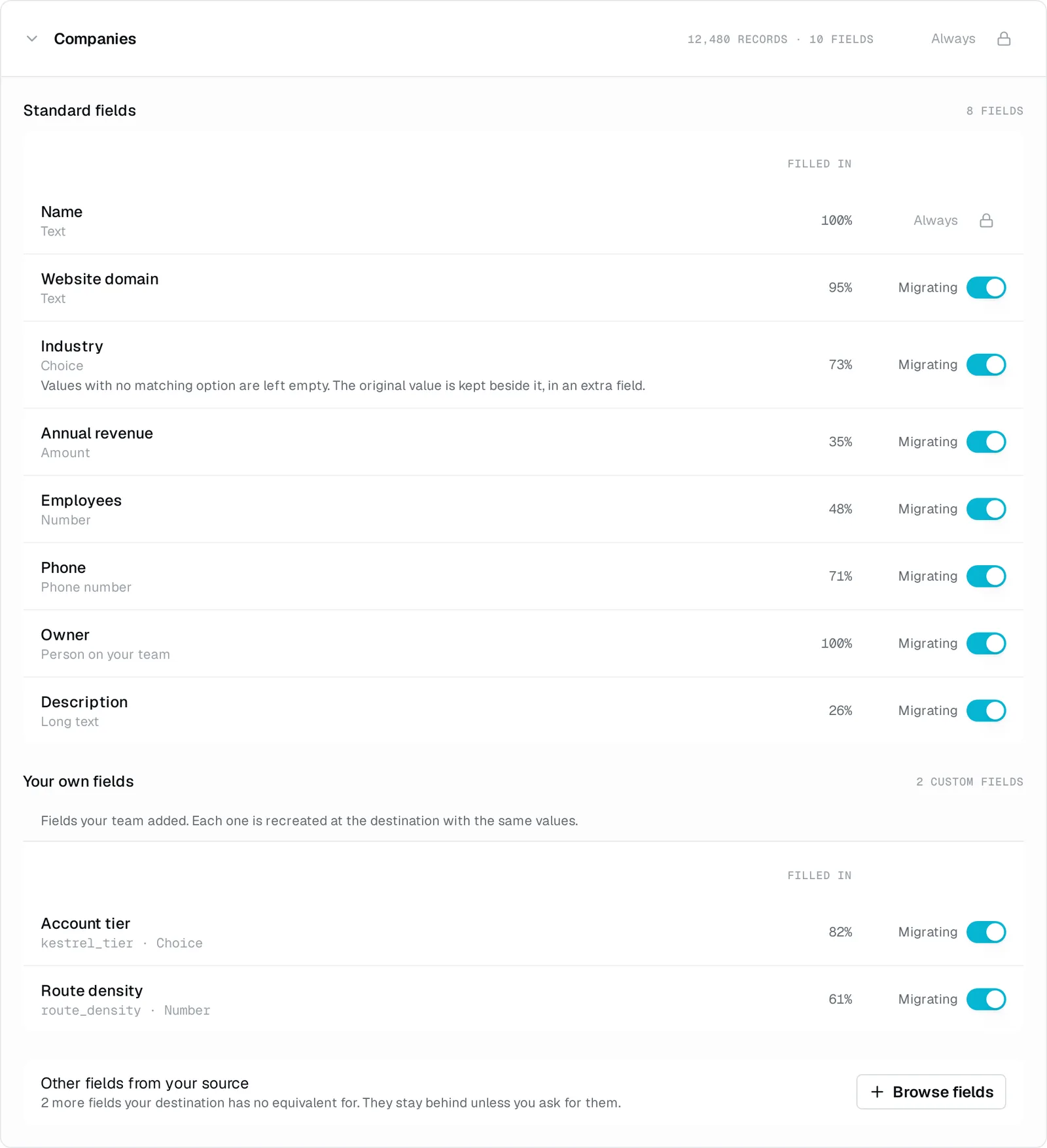
Demo output. Companies plan from the demo assessment. View at full size.
Contacts
48,930 records, 9 fields
Standard fields, 8
Filled in
EmailEmail address
94%
First nameText
98%
Last nameText
99%
Job titleText
64%
PhonePhone number
79%
Mobile phonePhone numberArrives as text, not a phone number.
45%
OwnerPerson on your team
100%
Email opt outYes or no
Not counted
Custom fields, 1
Filled in
Preferred depotpreferred_depot, choice
59%
1 more field from the source has no matching field in Salesforce CRM. Choose whether to include it.
Kept as extra fields, 1
Lifecycle stageHS_Source_Lifecycle_Stage__c, text
Kept as text
These values are preserved in extra text fields in Salesforce CRM.
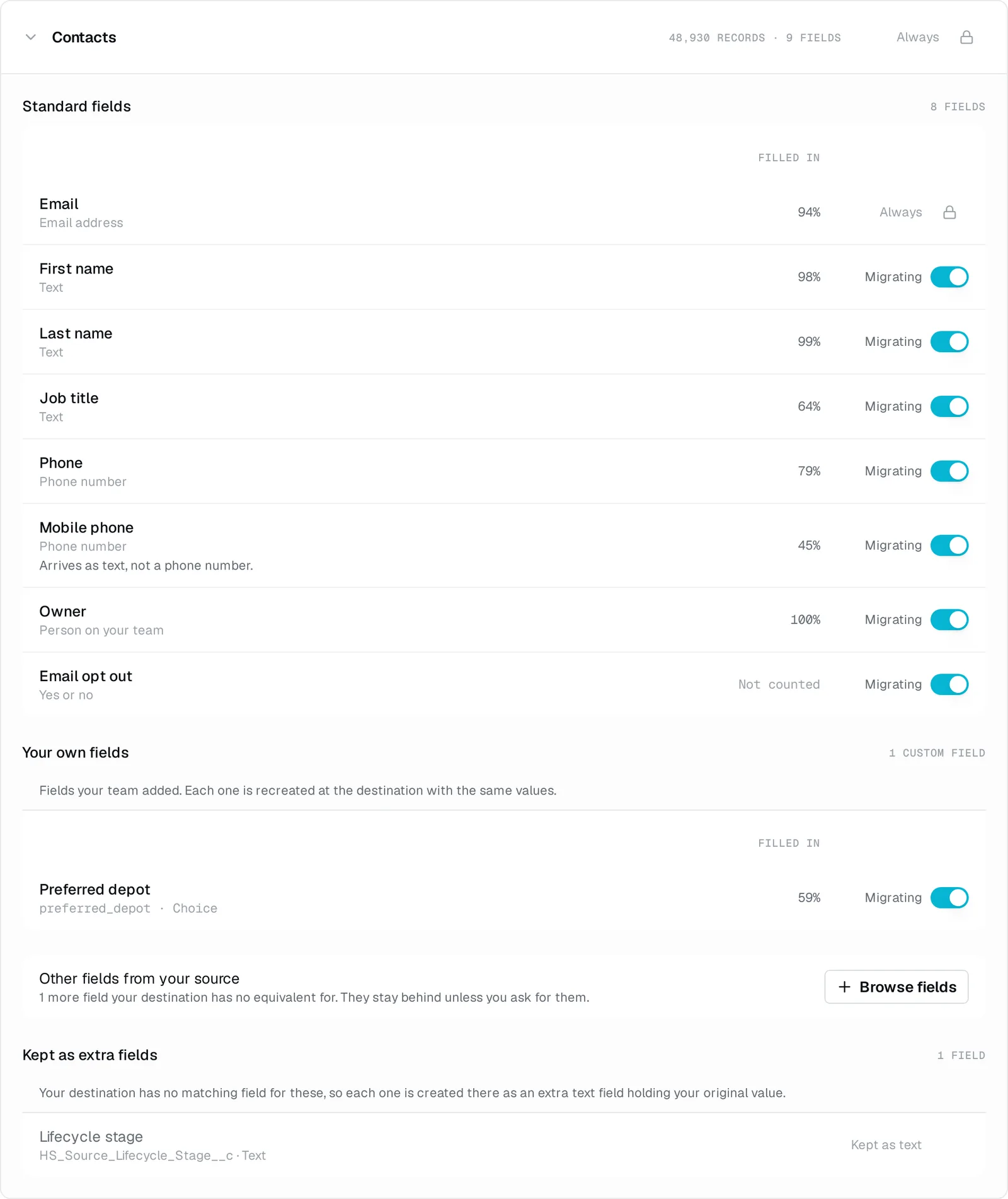
Demo output. Contacts plan from the demo assessment. View at full size.
Deals
9,860 records, 9 fields
Standard fields, 9
Filled in
NameText
100%
AmountAmountYour destination replaces this with a value of its own. Salesforce works a deal's amount out from its line items, so it becomes the total of the lines that came across.
97%
CurrencyText
100%
Close dateDate
95%
Deal typeChoiceValues with no matching option are left empty. The original value is kept beside it, in an extra field.
83%
Lead sourceChoiceValues with no matching option are left empty. The original value is kept beside it, in an extra field.
75%
Next stepText
40%
Lost reasonTextAdded to a text field, readable but no longer its own value.
22%
OwnerPerson on your team
100%
Kept as extra fields, 2
StageHS_Source_Stage__c, text
Kept as text
PipelineHS_Source_Pipeline__c, text
Kept as text
These values are preserved in extra text fields in Salesforce CRM.
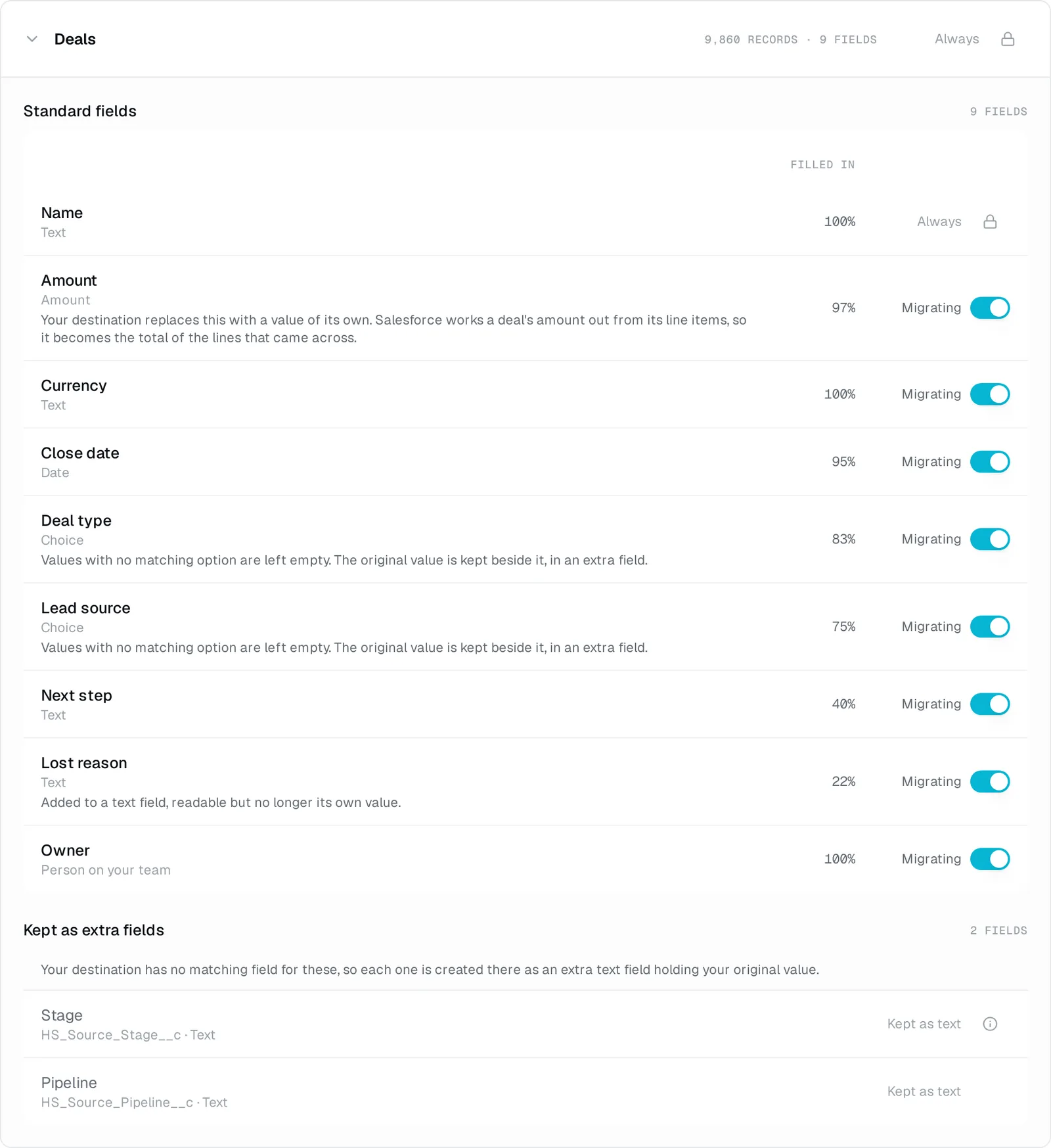
Demo output. Deals plan from the demo assessment. View at full size.
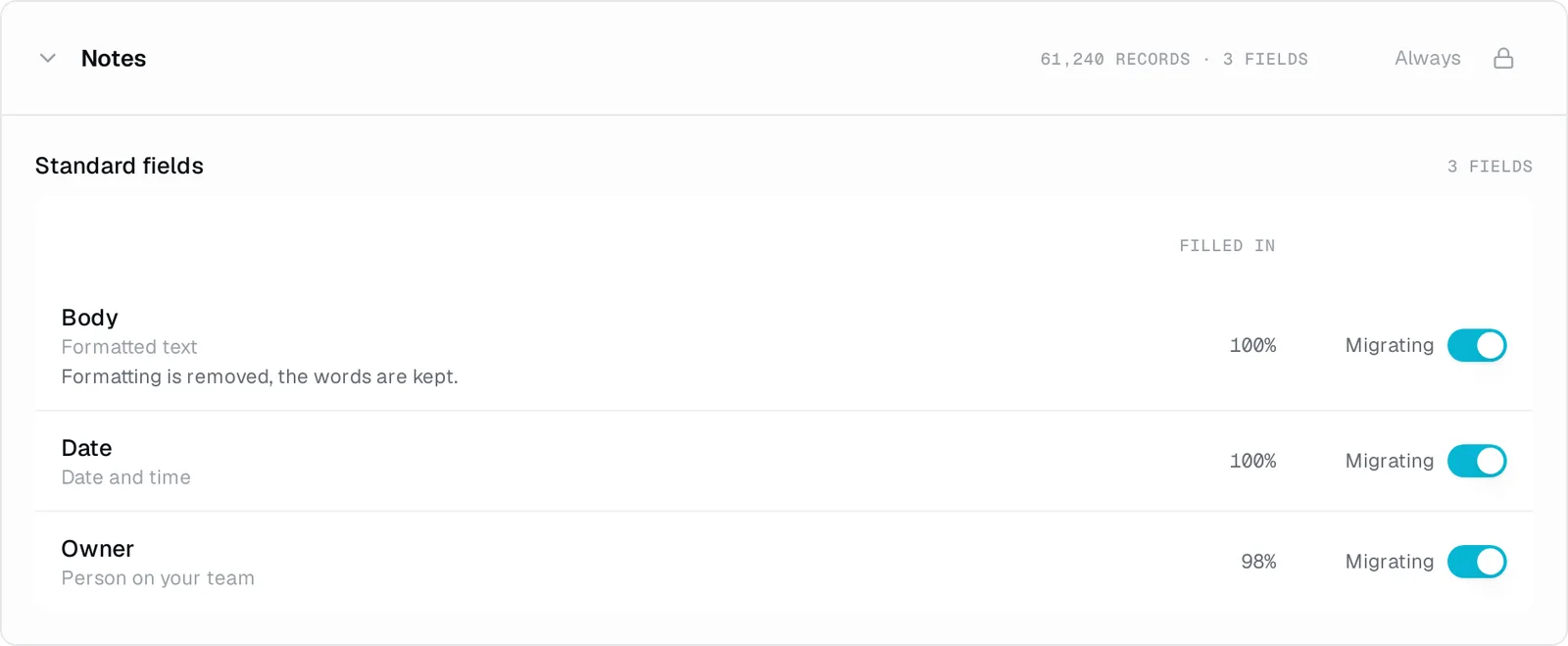
Notes
61,240 records, 3 fields
Standard fields, 3
Filled in
BodyFormatted textFormatting is removed, the words are kept.
100%
DateDate and time
100%
OwnerPerson on your team
98%
Demo output. Notes plan from the demo assessment. View at full size.
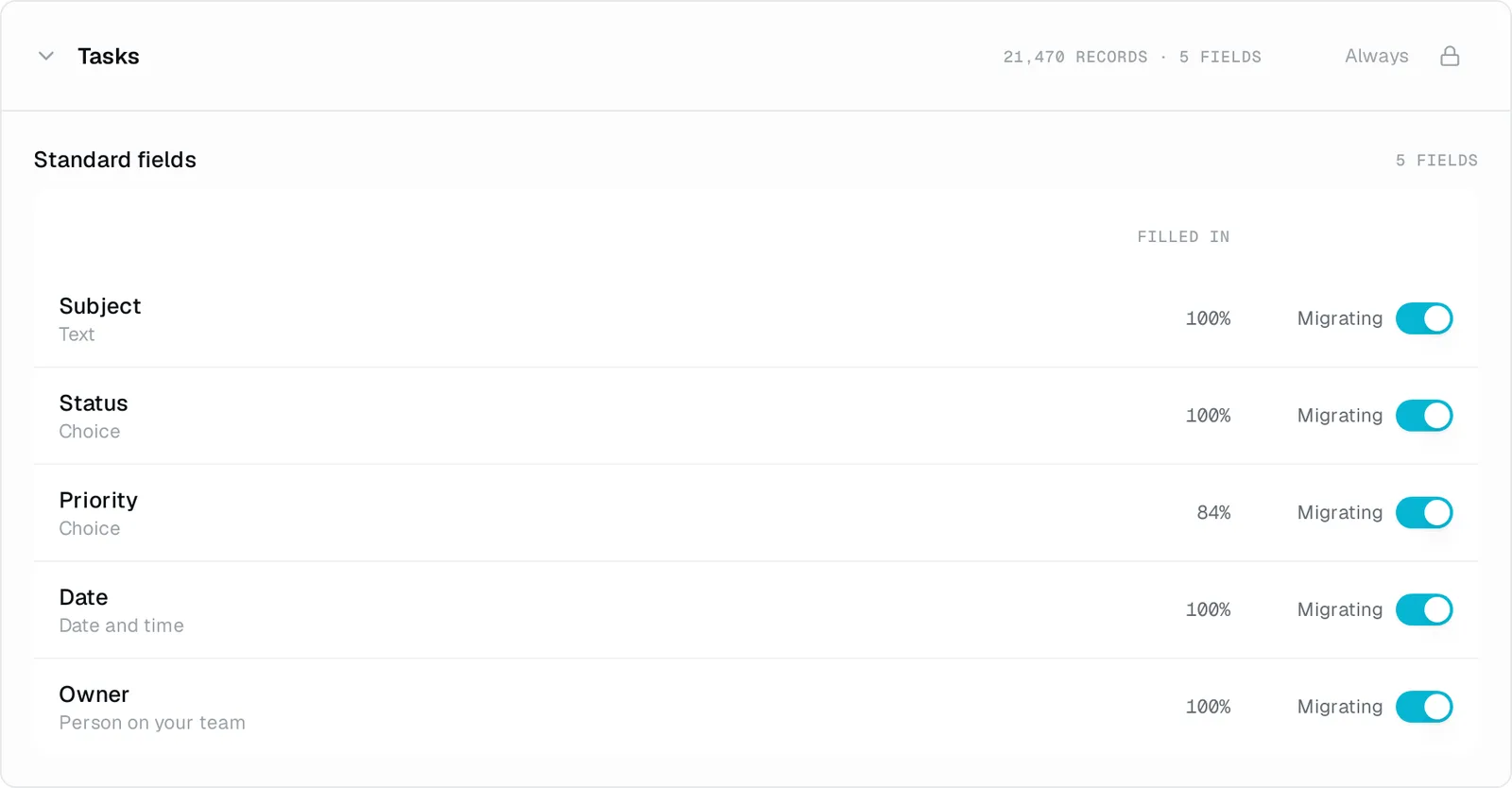
Tasks
21,470 records, 5 fields
Standard fields, 5
Filled in
SubjectText
100%
StatusChoice
100%
PriorityChoice
84%
DateDate and time
100%
OwnerPerson on your team
100%
Demo output. Tasks plan from the demo assessment. View at full size.
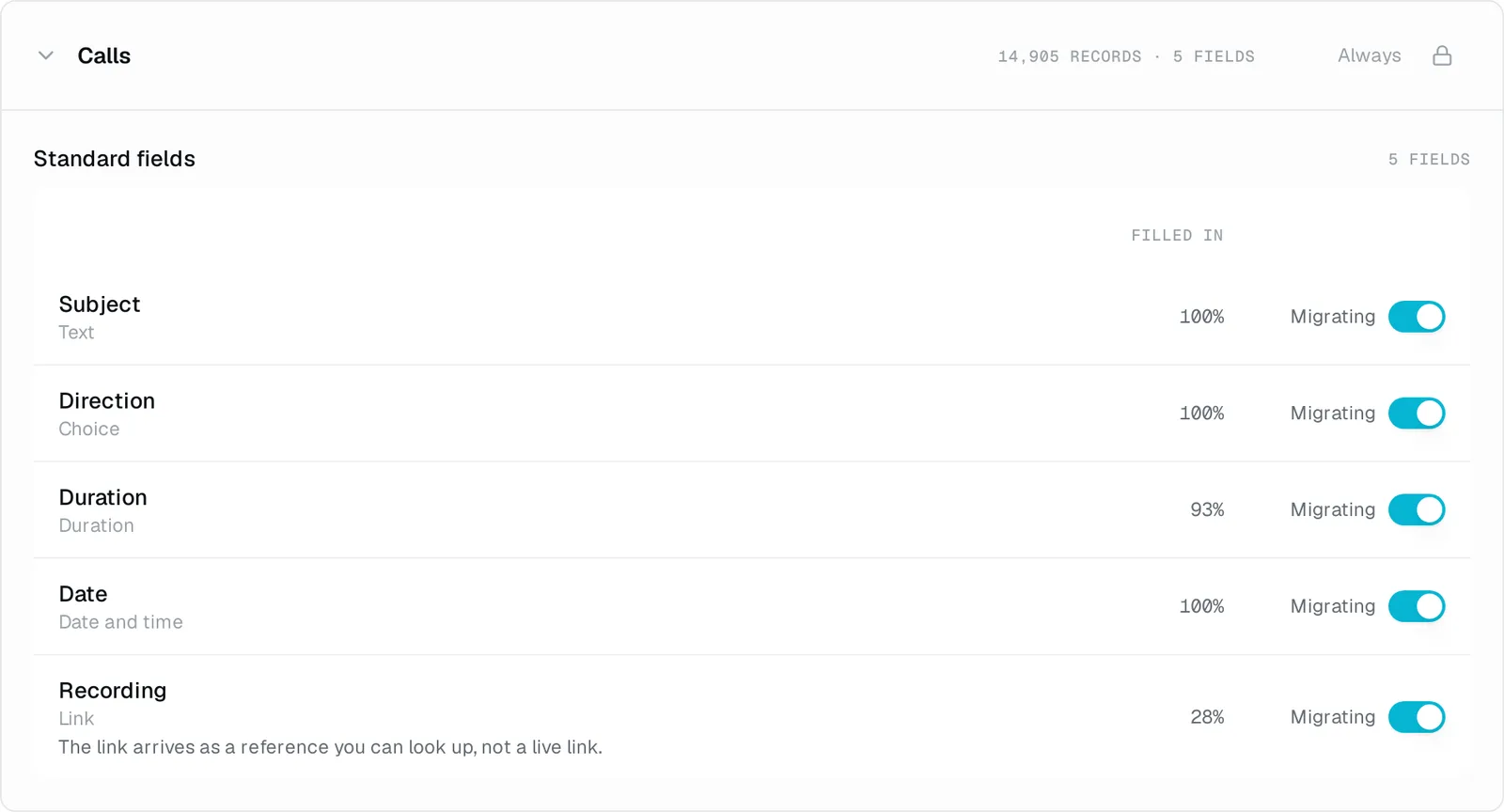
Calls
14,905 records, 5 fields
Standard fields, 5
Filled in
SubjectText
100%
DirectionChoice
100%
DurationDuration
93%
DateDate and time
100%
RecordingLinkThe link arrives as a reference you can look up, not a live link.
28%
Demo output. Calls plan from the demo assessment. View at full size.
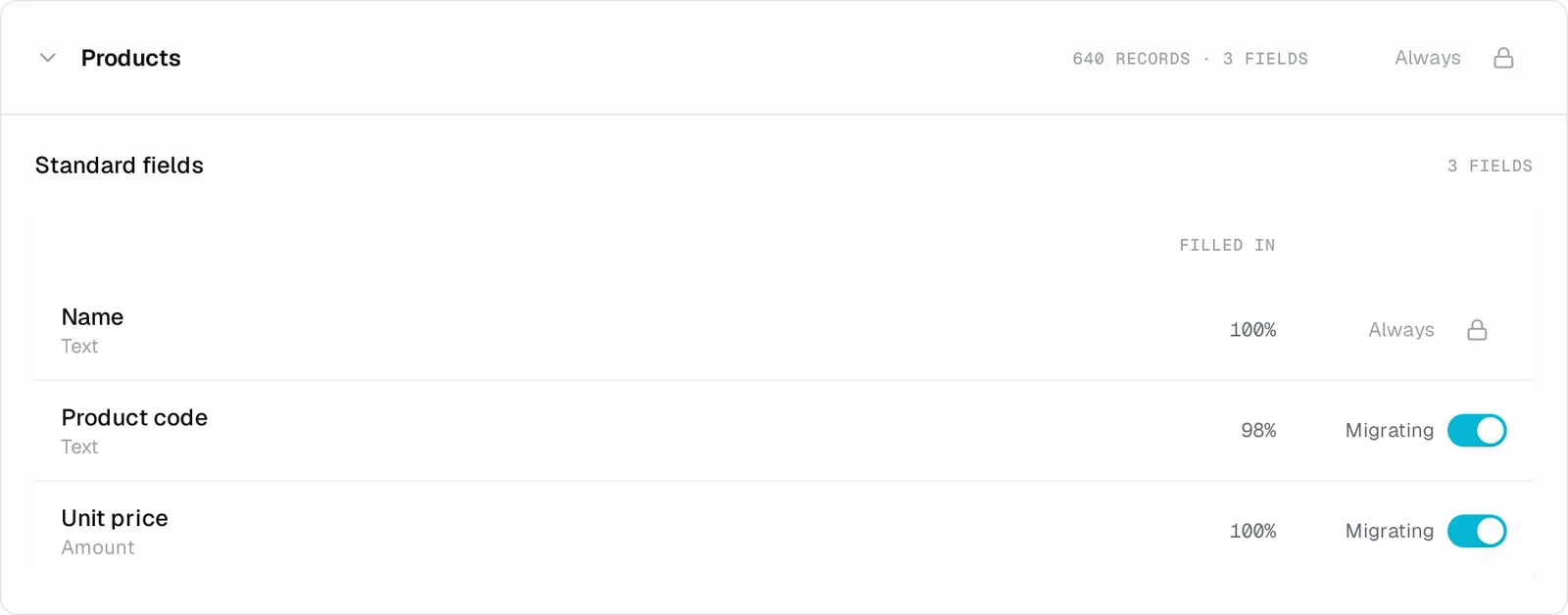
Products
640 records, 3 fields
Standard fields, 3
Filled in
NameText
100%
Product codeText
98%
Unit priceAmount
100%
Demo output. Products plan from the demo assessment. View at full size.
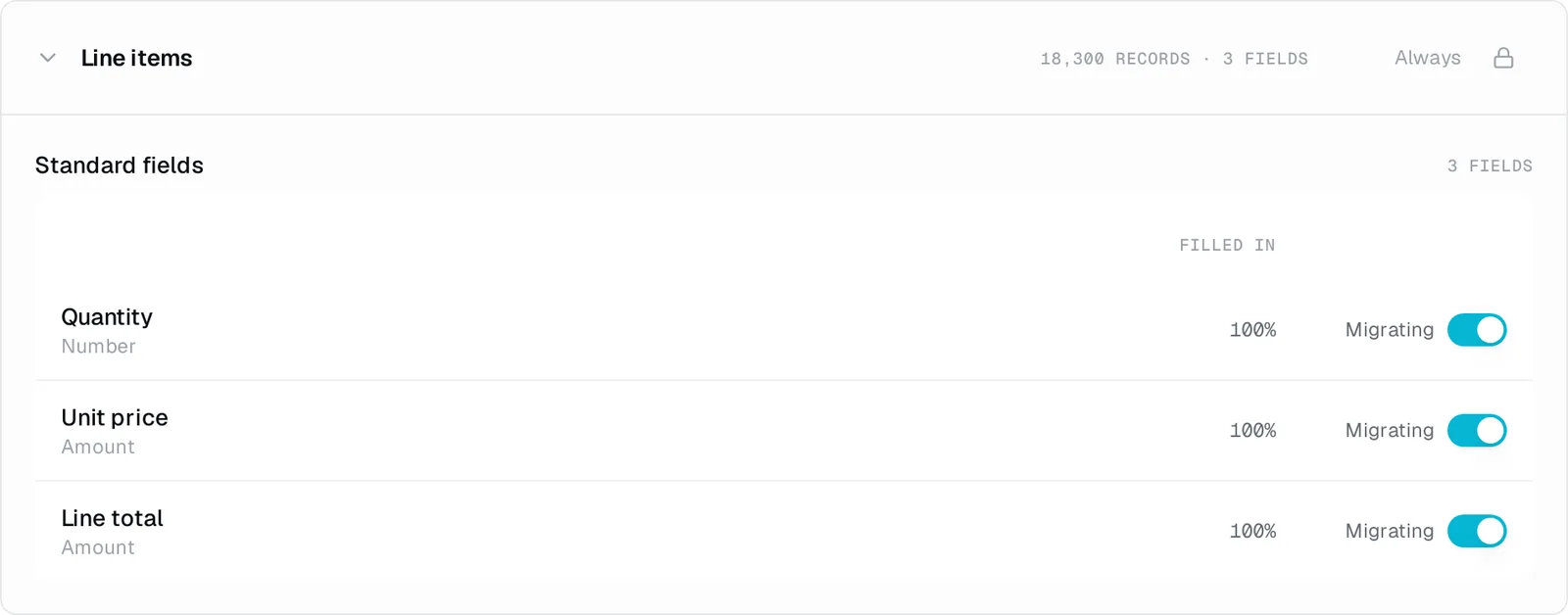
Line items
18,300 records, 3 fields
Standard fields, 3
Filled in
QuantityNumber
100%
Unit priceAmount
100%
Line totalAmount
100%
Demo output. Line items plan from the demo assessment. View at full size.
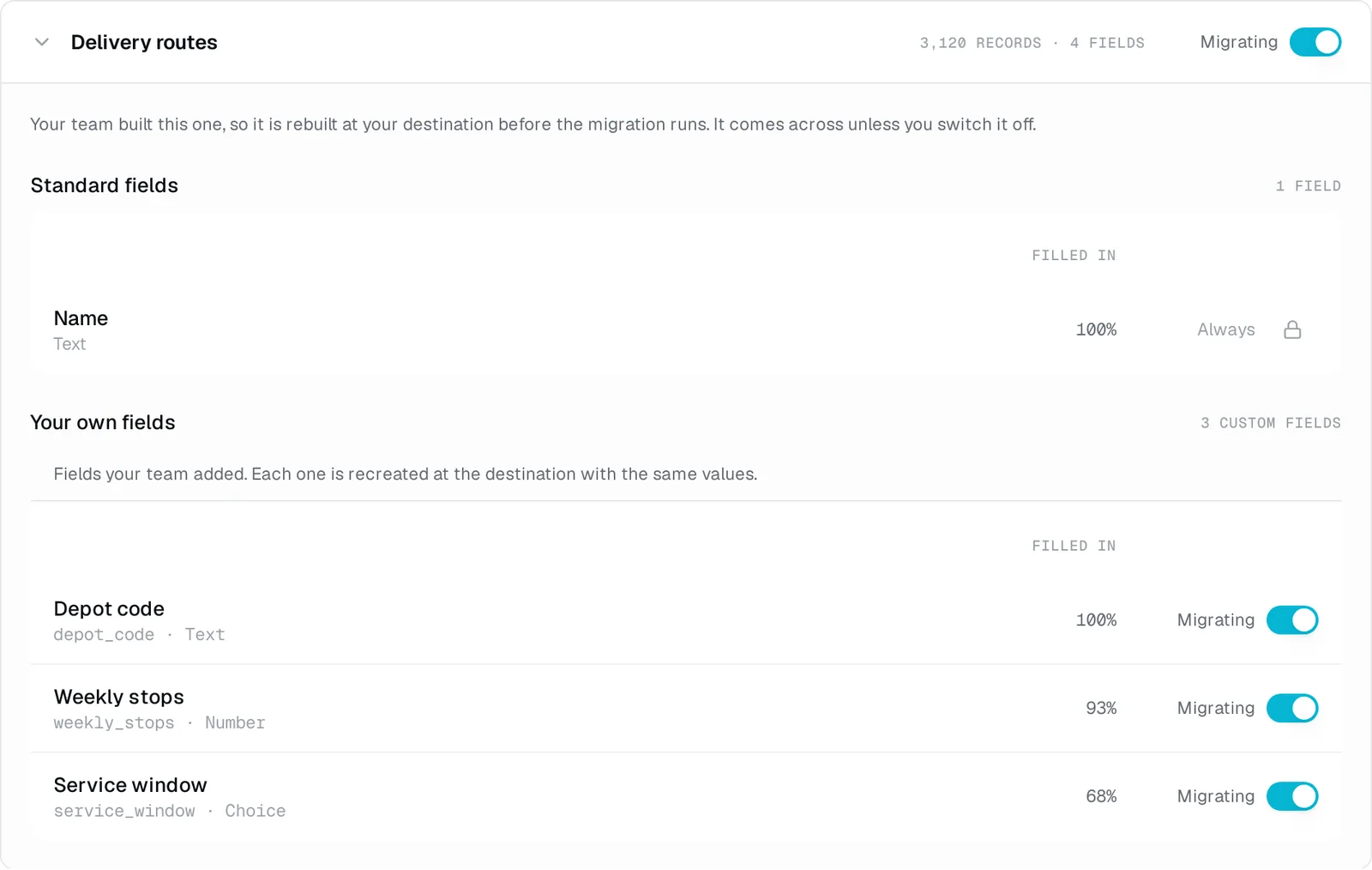
Delivery routes
3,120 records, 4 fields
Your team built this one, so it is rebuilt at your destination before the migration runs.
Standard fields, 1
Filled in
NameText
100%
Custom fields, 3
Filled in
Depot codedepot_code, text
100%
Weekly stopsweekly_stops, number
93%
Service windowservice_window, choice
68%
Demo output. Delivery routes plan from the demo assessment. View at full size.
Custom fields are created in the destination before their records are migrated.
03 The plan
Review what moves and what changes.
Migratez works out what each value becomes, so nobody builds a field map. You choose which optional fields to include and review any data that cannot transfer unchanged. If a record owner has no match in the new CRM, you choose who takes over their records.
04 Readiness checks
Check what needs attention before migrating.
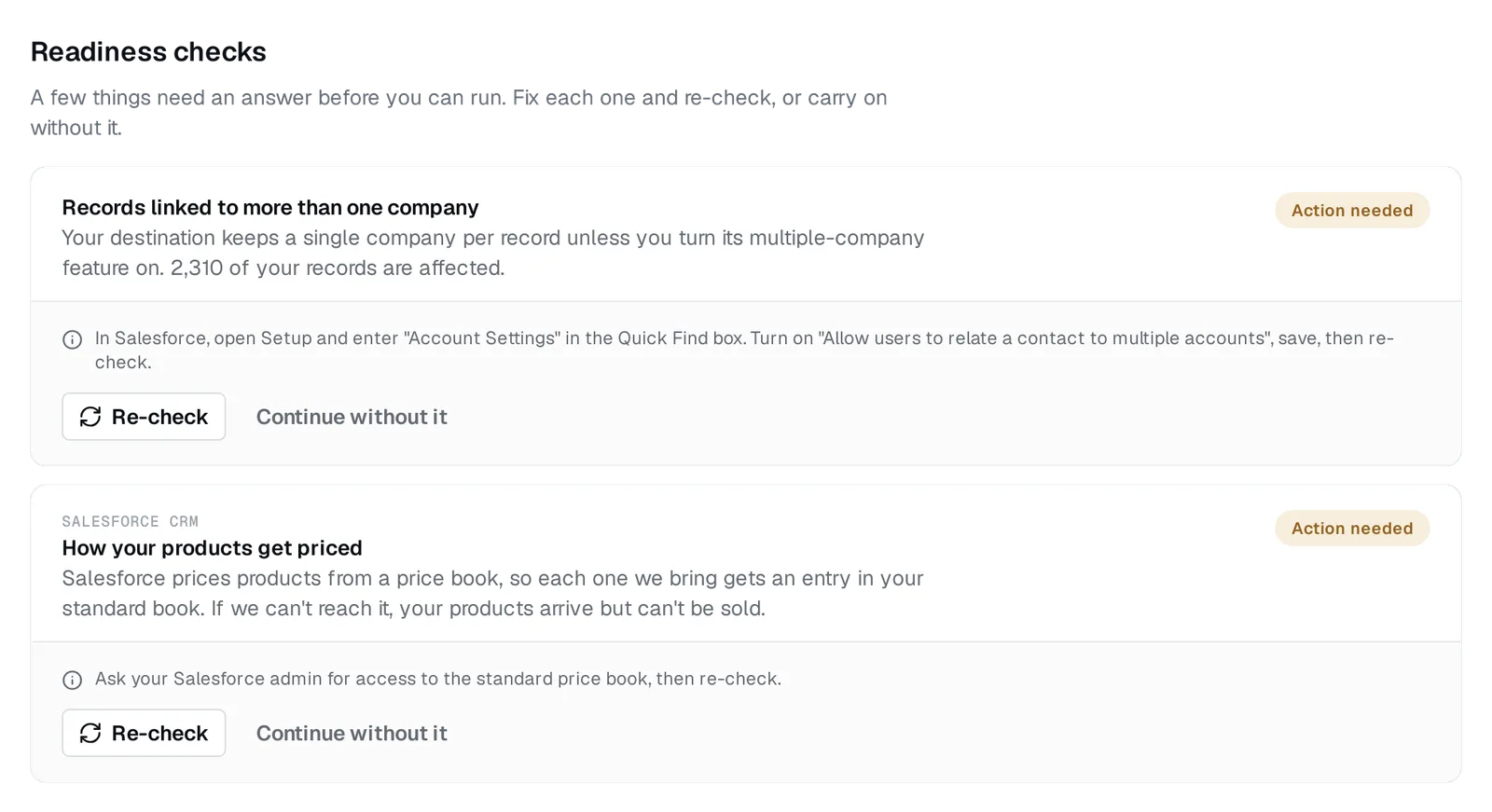
This demo raised 2 checks for destination settings or access. Each explains the impact and how to fix it. You can fix and re-check it, or proceed with the limitation.
Records linked to more than one company
Action needed
Your destination keeps a single company per record unless you turn its multiple-company feature on. 2,310 of your records are affected.
In Salesforce, open Setup and enter "Account Settings" in the Quick Find box. Turn on "Allow users to relate a contact to multiple accounts", save, then re-check.
How your products get priced
Action needed
Salesforce CRM
Salesforce prices products from a price book, so each one we bring gets an entry in your standard book. If we can't reach it, your products arrive but can't be sold.
Ask your Salesforce admin for access to the standard price book, then re-check.
Demo output. The two demo checks, with instructions and a re-check button. View at full size.
05 Data that changes
Know what changes before the migration runs.
Some values change format or cannot fit their destination field. The notes below explain each case. Values kept in extra text fields are listed separately. All notes are quoted from this demo plan.
Fields with changes, 8
Object
IndustryValues with no matching option are left empty. The original value is kept beside it, in an extra field.
Companies
Mobile phoneArrives as text, not a phone number.
Contacts
AmountYour destination replaces this with a value of its own. Salesforce works a deal's amount out from its line items, so it becomes the total of the lines that came across.
Deals
Deal typeValues with no matching option are left empty. The original value is kept beside it, in an extra field.
Deals
Lead sourceValues with no matching option are left empty. The original value is kept beside it, in an extra field.
Deals
Lost reasonAdded to a text field, readable but no longer its own value.
Deals
BodyFormatting is removed, the words are kept.
Notes
RecordingThe link arrives as a reference you can look up, not a live link.
Calls
Kept as extra fields, 3
Object
Lifecycle stageHS_Source_Lifecycle_Stage__c, text
Contacts
StageHS_Source_Stage__c, text
Deals
PipelineHS_Source_Pipeline__c, text
Deals
Demo output. The Deals plan shows calculated values, unmatched choices and two fields preserved as text. View at full size.
06 The price
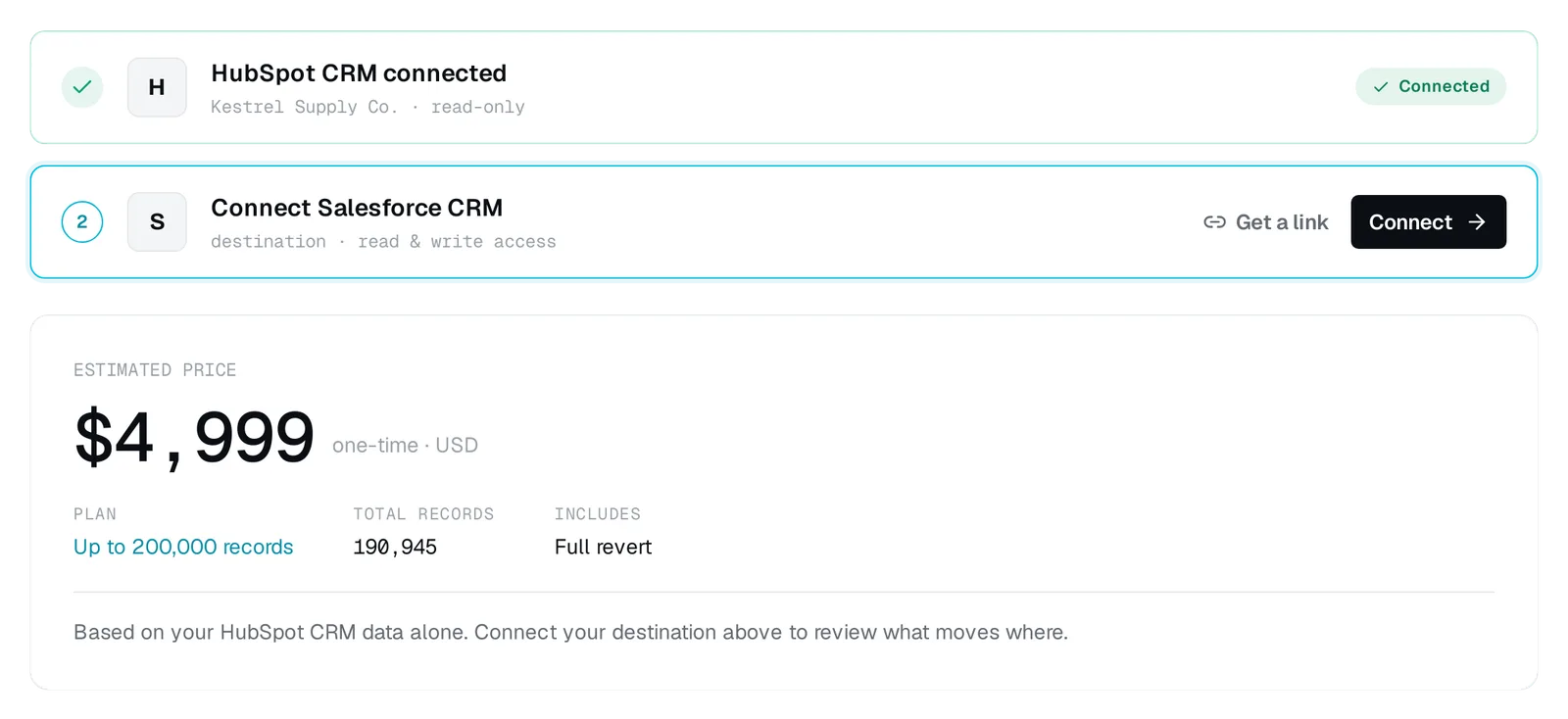
$4,999 USD. One migration, one payment.
The 190,945 demo records fit the tier for up to 200,000 records. The source assessment gives you a fixed price before you connect the destination.
Demo output. Price shown after connecting only the source CRM. View at full size.
Create an account and connect your source CRM with read-only access. See your record counts, field usage and price before connecting the destination. Nothing moves until you ask.